Using Envoy to Improve PHP Redis Client Performance
Redis plays an important role in Houzz’s technical stack, particularly for our key-value storage, caching layer and queue system. In this blog post, we will introduce our experience with Envoy proxy to help improve the performance of PHP Redis clients.
Redis uses standard Transmission Control Protocol (TCP) to connect with clients. To connect to a single Redis instance, the client establishes a TCP connection with the Redis server and sends raw commands using text. Clients can easily test a connection to the Redis server using the telnet command.

REDIS CLUSTER
Similar to many storage systems, Redis has a distributed mode called Redis cluster, which Houzz utilizes for our applications, including web servers, mobile API servers and batch jobs. You can read about Houzz’s migration to Redis Cluster in this blog post.
Redis scales from one instance to multiple instances by relying on the KEY hashing. As a key value storage system, Redis cluster tries to distribute all KEYs into different instances based on the cyclic redundancy check (CRC) hash of the KEY. Each instance in the Redis cluster only stores KEYs within its own slot ranges, and all instances in the Redis cluster cover the whole range of CRC hash, which is [0, 16384].
Redis also supports primary and secondary modes which could provide data redundancy and separate read or update operations. Each slot range can have one primary instance, with one or more replica instances storing the same KEYs.
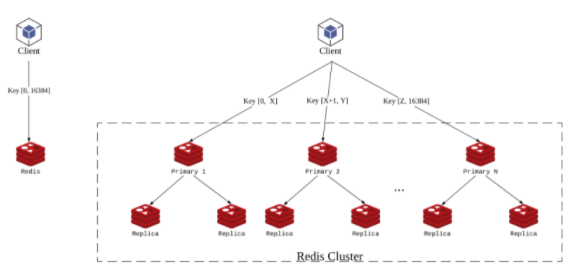
The operations on a single Redis instance vary based on the Redis cluster. To use a single Redis instance, we connect to the single socket address, whereas to use a Redis cluster, we use more complicated logic. Typically, a Redis cluster client supports the following features:
– Automatically discovers cluster topology. Since KEYs are stored in different Redis server instances, the Redis cluster client has to know which slot range is stored in which Redis server instances (including primary and replicas). Redis cluster provides a ”CLUSTER SLOTS” command that can return the server topology with arrays of slot range and primary or replica socket addresses. To execute the ”CLUSTER SLOTS” command, the Redis cluster client needs to know at least the address of one node in the Redis cluster topology, which is usually passed on as start probe address(es) when initializing the client instance.
– Dispatches commands to Redis server instances on demand. When using the Redis cluster client to send a command that carries KEY parameters to the Redis cluster, the client must determine which Redis server instance(s) to send the command to. This is determined by the server topology fetcher in the previous step.To calculate the CRC hash of the KEY(s), find the slot range where the KEY resides, and then based on the read / write policy, send the command to the primary / replica Redis server instance of the slot range that the KEY belongs to. For some commands operating multiple KEYs (e.g. mget, mset, etc.), the client must split the single multiple key command into several batches based on the slot range group of the KEYs, and send the command with each group’s KEYs to the corresponding Redis server instance, and merge the results from all instances. Note that some client libraries didn’t implement this “advanced” feature, therefore they declare that they don’t support multi-key commands with keys across slots.
There are many Redis client libraries developed in various languages that could help to mitigate the difference between connecting to a single Redis client or Redis cluster. In most of the scenarios, programmers may not notice the difference between using a single Redis instance or Redis cluster, because the complexity is encapsulated by the client libraries.
OUTLINING CHALLENGES WITH THE PHP REDIS CLUSTER CLIENT
A single Redis instance can satisfy small use cases. Supporting the scale of Houzz’s business requires a Redis cluster in order to be distributed into different instances.
Houzz set up a Redis cluster with hundreds of instances, with primary / replica enabled, to make sure we have data redundancy and the ability to recover from single instance failure.
PHP is one of Houzz’s main development languages and also one of the most popular programming languages in web development. We use predis, a widely used PHP Redis client that supports the Redis cluster. It provides features such as automatic cluster topology discovery and on demand dispatch commands to Redis server instances.
We are satisfied with the functionality of the PHP Redis client, however, the PHP language presented performance challenges that needed to be solved.
Unlike Java, Python or Node server applications, the PHP process does not share data between subsequent requests. Once PHP handles a web request, it will discard all of the data before it’s ready to handle the next request.
Why does this impact the performance of the Redis cluster client?
The primary concern is that the cluster topology is shared across requests. When handling the very first command, predis connects to send the “CLUSTER SLOTS” command to one of the start probe Redis instances, and gets the cluster topology. However, since PHP is not a long running process, the topology cannot be passed to the next request. Therefore, in the next request, predis has to reconnect to one of the start probes, and resend ”CLUSTER SLOTS” to get the cluster topology. This is extremely ineffective since Redis cluster topology rarely changes. It only changes when Redis nodes are taken down or new Redis nodes are added, causing a rebalance. The extra ”CLUSTER SLOTS” command usually adds four to five milliseconds to the Redis access time per request. If there is only one redis operation needed in the request, then 100 percent more overhead is added than required.
Another natural behavior of the PHP process is that TCP connections cannot persist between two requests.
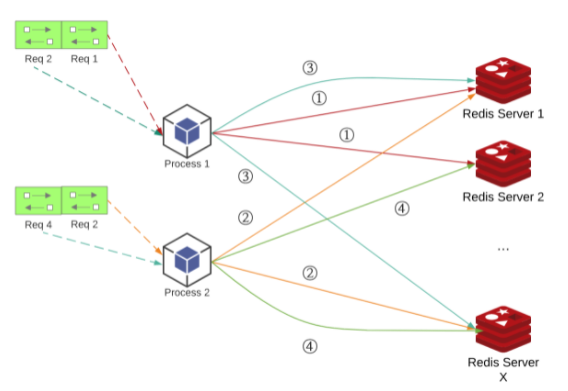
Suppose two PHP processes are running on a single machine, as is shown in the above graph. Two requests are handled per process and each request must connect to two Redis server instances. The subsequent requests handled by the same process will connect to the same Redis server instance, yet since the previous request’s TCP connection is closed, it cannot be reused. Even if it connects to the same socket address (of the Redis server instance), it has to create another TCP connection.
So, as a PHP process is handling more and more requests, it creates and closes more and more TCP connections to Redis clusters. Compared to other languages which could maintain persistent TCP connections in the process, this is a major performance loss.
Another more critical problem is that a TCP connection’s termination is not a direct close and does not release the resource immediately.
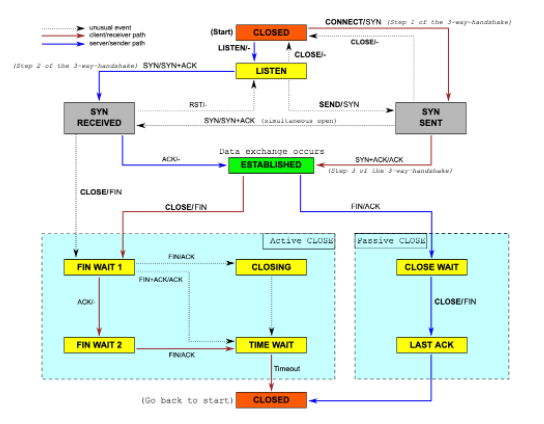
As described in the above graph, in active close mode, when the TCP connection initiator (in this case the PHP Redis cluster client) starts to close the connection, it sends a FIN packet through the TCP connection. The TCP connection receiver (Redis cluster instance) must send ACK + FIN packets back. Due to the nature of the TCP connection, an initiator will turn into TIME_WAIT status until finally it times out and the connection is closed. The TCP connection resource is then recycled by the system.
Due to the PHP Redis cluster client access pattern, new TCP connections to PHP Redis cluster instances continue to be created and then close immediately after one session ends. Due to the QPS of our production traffic volume to one box, too many TIME_WAIT TCP connections are left in the box. Once TIME_WAIT TCP connections pile up, new TCP connections are created more slowly, thus making the Redis cluster client slower. This causes web request response time to increase and more requests get stuck. In the end, it reaches a threshold where the Redis cluster client fails to create TCP connections within the timeout settings (4 seconds), resulting in an error saying the Redis server is down.
We noticed this issue when our access volume significantly increased (which is a very good sign from a business perspective), and we saw more errors regarding Redis server downtime and performance degradation during peak hours. But Redis servers were actually not under pressure at all, the bottleneck was purely from the TCP connections from the client side. This caused the SRE team to increase the instances of our application boxes, which was unnecessary, and a waste of our computing resources.
OUR APPROACH TO SOLVE THE PROBLEM
In researching “too many TIME_WAIT tcp connections”, some of blogs will lead to the following solution: Enable TCP reuse feature to reduce the TIME_WAIT TCP connections.

We believed this would work, and added this option to the system default setting of our production boxes, however, it didn’t help. The TCP connections in TIME_WAIT state were still high.

Inspired by the “Coping with the TCP TIME-WAIT state on busy Linux servers” blog post, we believe it didn’t work because by enabling net.ipv4.tcp_tw_reuse, Linux reuses an existing connection in the TIME-WAIT state for a new outgoing connection if the new timestamp is strictly bigger than the most recent timestamp recorded for the previous connection. An outgoing connection in the TIME-WAIT state can be reused after just one second.
Within “just one second”, since the QPS of the box is around 100, it likely creates approximately 100 (avg QPS) multiplied by 50 (the average number of Redis connections in one request), equaling 5,000 new TCP connections. These 5,000 connections cannot reuse the TIME_WAIT connections left intact in the exact second. Before it could benefit from the TCP reuse mechanism, too many TIME_WAIT TCP connections held up the kernel from creating new TCP connections, thus this didn’t provide a workable solution.
ENVOY / ENVOY REDIS CLUSTER
We introduced Istio as our service mesh solution to our Kubernetes cluster in 2020, and it started to play as the proxy for all network traffic to and from our web application container.
Envoy, as the proxy implementation of Istio, provides a lot of features that help abstract the networking logic from the application code.
One inspiring feature that Envoy provides in the newer versions, which is the final solution we used for solving this issue, is Redis Cluster support.
When using Envoy as a sidecar proxy for a Redis Cluster, the service can use a non-cluster Redis client implemented in any language to connect to the proxy as if it’s a single node Redis instance. The Envoy proxy will keep track of the cluster topology and send commands to the correct Redis node in the cluster according to the spec. Advanced features, such as reading from replicas, can also be added to the Envoy proxy instead of updating Redis clients in each language.Envoy proxy tracks the topology of the cluster by sending periodic cluster slot commands to a random node in the cluster, and maintains the following information:
– List of known nodes
– The primaries for each shard
– Nodes entering or leaving the cluster
With this feature enabled, the PHP Redis client’s cluster related logic is taken over by Envoy. PHP Redis clients only need to create one connection to the proxied Redis instance provided by Envoy.
In order to configure the Envoy Redis cluster proxy we needed to create a backend cluster.
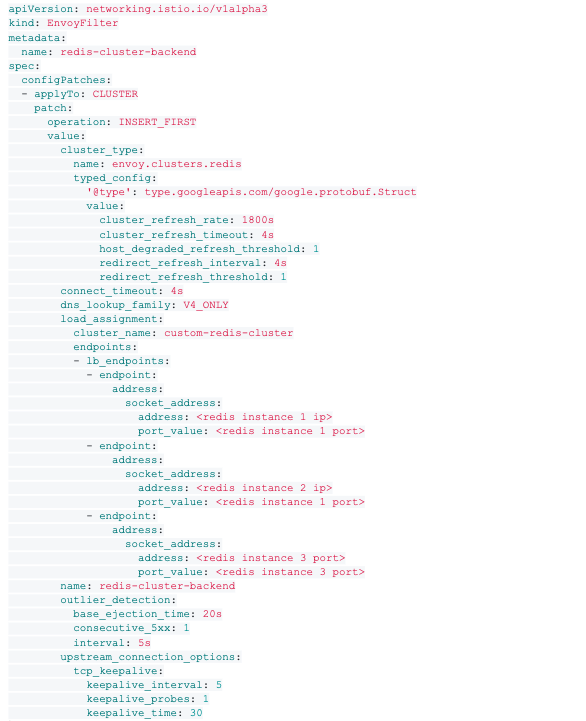
In the backend settings, the most important setting is the load_assignment. It basically describes the startup probe nodes where Envoy will send the CLUSTER SLOTS command to get the cluster topology.
For better performance, we recommend turning on the following settings:
– cluster_refresh_rate: This is the interval between CLUSTER SLOTS commands sent from Envoy to startup probe nodes. Redis cluster topology doesn’t typically change frequently, so you can sest this value much longer than the default value (five seconds).
– host_degraded_refresh_threshold: The number of hosts became degraded or unhealthy before triggering a topology refresh request. This is very helpful because we configure the cluster_refresh_rate to be as long as possible. Once the Redis cluster topology changes between two refreshes, setting this config to a low value (one for the most aggressive) will immediately let Envoy send CLUSTER SLOTS commands to get the new topology and remove potential problematic nodes out of the connection pools.
– redirect_refresh_threshold: The number of redirection errors that must be received before triggering a topology refresh request. Sometimes, when we add or remove nodes from Redis cluster, the key will rebalance among the new cluster instances and cause some response to be MOED or ASKED. In this case, we let Envoy send CLUSTER SLOTS commands to get the new topology immediately.
– outlier_detection: A unified mechanism in Envoy to detect outlier upstream hosts. In the Envoy Redis cluster, an upstream represents one Redis cluster server in the topology. Suppose a Redis cluster node was suddenly down, the following request to the node would get an ERR response. The consecutive_5xx setting is the threshold or ERR responses in past interval time so as to consider the node to be unhealthy. Once the node is considered unhealthy, it would be taken out of the upstream servers, try to be put back after base_ejection_time, and exponentially backoff in following degradations.
– upstream_connection_options: An action for tuning the keep alive setting for TCP connections between Envoy and Redis cluster nodes. Envoy will connect to Redis cluster notes on demand if the PHP client tries to send a command to the destination notes. After the command is sent, the connection remains in an ESTABLISHED state. But, if the connection stays too long without sending any packages to the Redis cluster note, it might be closed by the Redis cluster note, in order to extend the life of the TCP connection. We could configure Envoy to send keepalive packets to the Redis cluster node after the keepalive_time once the connection is established, and set it to send keepalive_probes times between keepalive intervals.
In order to let the PHP client in the main container connect, you need to create a frontend Envoy.
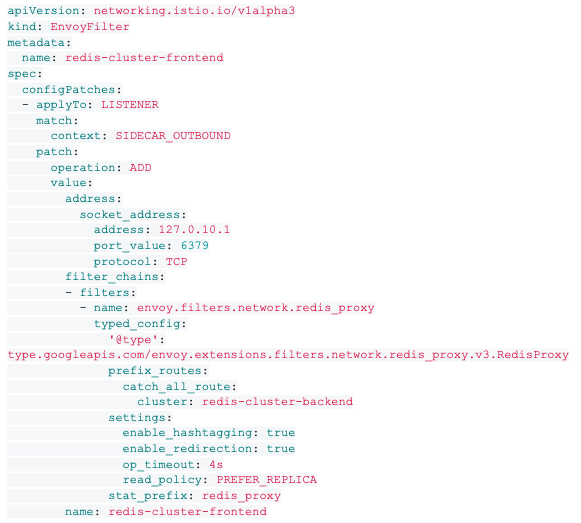
The above configuration creates a Redis proxy frontend on 127.0.10.1:6379. This address is available to the other containers aside from istio-proxy. The most important config, is prefix_routes.catch_all_route to redis-cluster-backend cluster which is the exact backend cluster we created before. The config of a proxy frontend is relatively simple, with fewer settings that can be tuned. One important setting is read_policy. Chose PREFER_REPLICA to achieve the functional parity as the original PHP Redis cluster client’s logic. When reading from Redis (get, mget, etc.), always read from replica nodes. Only read from primary nodes when all replica nodes for the slots are not available.
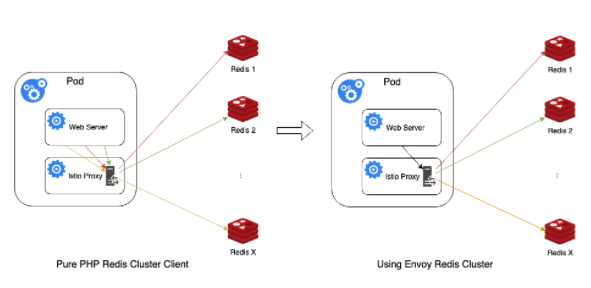
The above graph directly shows the magic of using Envoy Redis cluster proxy to save TCP connections.
Suppose in one process request, the PHP Redis client needs to connect to X Redis cluster instances. It has to create X TCP connections from the main web server container to an istio-proxy container, and Envoy has to create corresponding X TCP connections from the istio-proxy container to Redis cluster instances.
After using the Envoy Redis cluster proxy, the PHP client only needs to connect to the frontend proxy in an istio-proxy container, and Envoy will “smartly” dispatch the commands to a proxy backend, and create connections to X Redis cluster servers.
RESULTS
We saved X – 1 TCP connections for one request handled by the PHP process. What’s more, the X connections created between the Envoy Redis cluster proxy backend and the real Redis cluster services are persistent connections, so they do not close after the PHP process finishes handling that request. Furthermore, other requests handled by other PHP processes in the main web server container could also reuse the connections since the frontend and backend are separated. This leads to a huge savings of TCP connections.

By doing this, we broke the natural limitation of PHP language and reduced TIME_WAIT TCP connections by 95 percent!
We also saw a great reduction of the average Redis connection time per request, which dropped from approximately five milliseconds to nearly zero milliseconds. Explanations for this include:
– Much fewer connections need to be made since all commands are sent to the same frontend proxy by PHP client, thus only one connection needs to be created per request.
– Connection to the frontend is via a local network (from the main container to an istio-proxy container), which is much more stable and lightweight.
We rolled out this solution to 100 percent of our production Kubernetes clusters, and indeed, it solved the bottleneck of TIME_WAIT TCP connections, and enabled our Pods to accommodate more traffic. It also leads to some savings of the Kubernetes resources.
CAVEATS
Despite the benefits of Envoy Redis cluster proxy, be aware of the following caveats for using it.
Read / Write performance degradation
We mentioned the average TCP connection time reduced from approximately five milliseconds to nearly zero milliseconds. But for read / write Redis operations, the performance degraded a bit. Understandably, Envoy still needs to create the TCP connections to Redis cluster nodes, send the command packages to the nodes, and receive the responses. So, even more logic was added to dispatch commands to the correct node(s) and aggregate responses from multiple nodes (e.g. mget, mset). This degradation was more obvious for sparse requests when the TCP connection reuse in the proxy backend wasn’t given much benefit.
Despite this consistent performance degradation, the overall average read / write time was still faster compared to the rest of PHP code logic.
Lack of retry logic
The auto retry logic was a very important feature in the old PHP Redis Cluster client. Generally, each shard of the Redis cluster consists of one primary node and two replica nodes. When the PHP Redis cluster client sends a read command, it first picks a random replica to send the command. If the command fails due to network communication issues, it will retry to send the command to the other replica node. If it still fails, it will ultimately send the command to the primary node.
This logic is straightforward and very helpful in mitigating downtime. Suppose we are doing a rolling restart of the whole Redis cluster. Typically we restart one node at one time, so the retry logic will make sure the request can still be properly handled.
Unfortunately, built-in retry logic is still on the planned future features list as of 2021. We tested putting down one replica node in one shard and noticed there were approximately 10 seconds of downtime resulting in client errors of “no upstream hosts” from Envoy. This downtime could be mitigated by tuning the outlier_detection settings, when the node is down. Subsequent requests to the specific node will then be errored out. After the outlier_detection.interval time, it will be taken out of the upstreams and Envoy will stop sending any more commands to this node.
Currently there is no solution to bypass this issue. While we retried within the PHP client, it couldn’t decide which Redis cluster node that Envoy would connect to.While we wait for the built-in retry logic to be supported, we have settled on a lack of retry logic, and rely on the outlier_detection mechanism to mitigate downtime.
Too many ESTABLISHED connections
One problem we foresee is that before our PHP clients create TCP connections to Redis cluster nodes, they will disconnect soon after the request is processed. The “come and go” pattern actually has a benefit that overall Redis cluster nodes do not have too many ESTABLISHED connections from the clients.
When we started testing using the Envoy Redis cluster proxy, we immediately noticed a dramatic increase of ESTABLISHED connections from the Redis server nodes. The increased persistent connections have impacted the connection performance – if one Redis cluster node has been connected by too many clients, newer connections will be more difficult to make.
To improve this, we turned down the timeout setting in redis.conf on the Redis server side from 300 seconds to half of the value, and it helped to reduce 30 percent of the ESTABLISHED connections in our workload. The timeout setting lets the Redis server close the connection after a client is idle for a specific period of time. However, the trade off is that the shorter the timeout setting is configured, the more likely Envoy will have to connect more frequently to Redis cluster nodes, and negatively impact the overall Redis client performance.
Another solution is to increase the number of Redis cluster nodes, so the average connections to one Redis cluster node will drop, however, this will waste unnecessary resources if the Redis workload is not high enough on each node.
We hope our experience will be useful for other developers to reference as they scale. If you’re interested in joining us, we’re hiring! Check out opportunities on our team at houzz.com/jobs.